Gefunden im Netz

  • Gefunden im Netz

    FinalWire veröffentlicht AIDA64 v7.30

    Das allseits beliebte Diagnose und Monitoringtool AIDA64 ist in Version 7.30 veröffentlicht worden. Die Highlights lauten:

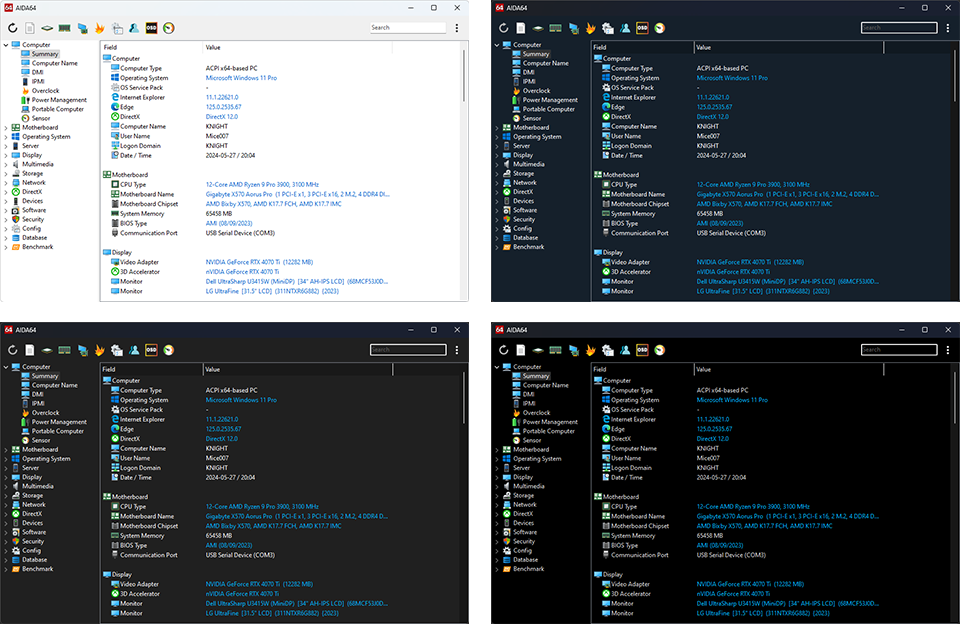
    Dark Mode improvements

    Dark Mode with three new themes: gray, black, and blue, tailored to enhance your experience in low-light conditions. This update includes automatic theme switching that aligns with Windows Dark Mode settings, ensuring a seamless transition. Additionally, users can enjoy fully customizable dark report styles, allowing for a personalized look. This feature not only improves readability and reduces eye strain but also provides a sleek and modern aesthetic for your reports.
     

    SensorPanel improvements

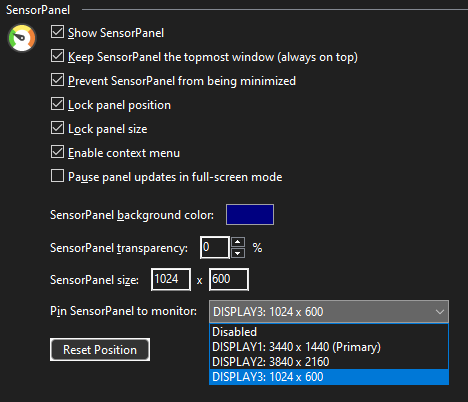
    The new „pin to monitor“ feature in SensorPanel allows AIDA64 to display the SensorPanel on a selected external LCD. This ensures that users can keep essential sensor data always visible without needing to move the window to the specific screen. It enhances convenience and efficiency by providing real-time monitoring of critical metrics such as temperature, voltage, and fan speeds on an external display.
     

    New features & improvements

    • Support for Microsoft Windows 11 2024 Update 
    • System Stability Test: optimized clocks measurement
    • High Contrast Mode improvements
    • SensorPanel: pin to monitor
    • Support for Intel Meteor Lake-PS CPU
    • Online User Manual
    • Razer PWM PC Fan Controller sensor support
    • Improved support for Intel Arrow Lake and Lunar Lake processors
    • Preferences: optimized opening latency
    • Intel Arc A310E, Arc A350E, Arc A370E, Arc A380E, Arc A580E, Arc A750E GPU support
    • nVIDIA RTX A400, RTX A1000 GPU support

    Quelle: Pressemeldung / Mail



  • Gefunden im Netz

    Grafiktreiber-Updates vom 16.05.24

    Hier findet ihr die aktuellen Grafikkartentreiber für die relevantesten drei Anbieter.  Es erfolgen ausschließlich Links zu Windows 10 und 11 in der 64Bit Version. Die unterstützen Modelle seht ihr im Treiber-Link.

    Gekennzeichnet sind die Treiber mit Beta/RC/Optional oder WHQL, in einigen Fällen gibt es auch beides. Eine automatische Aktualisierung empfehle ich nicht. Genaue Details und Changelogs findet ihr in den jeweiligen Links zu den Treibern.

    AMD

    NVIDIA

    INTEL

  • Gefunden im Netz

    Grafiktreiber-Updates vom 26.04.24

    Hier findet ihr die aktuellen Grafikkartentreiber für die relevantesten drei Anbieter.  Es erfolgen ausschließlich Links zu Windows 10 und 11 in der 64Bit Version. Die unterstützen Modelle seht ihr im Treiber-Link.

    Gekennzeichnet sind die Treiber mit Beta/RC/Optional oder WHQL, in einigen Fällen gibt es auch beides. Eine automatische Aktualisierung empfehle ich nicht. Genaue Details und Changelogs findet ihr in den jeweiligen Links zu den Treibern.

    AMD

    NVIDIA

    INTEL

  • Gefunden im Netz

    Grafiktreiber-Updates vom 20.03.24

    Hier findet ihr die aktuellen Grafikkartentreiber für die relevantesten drei Anbieter.  Es erfolgen ausschließlich Links zu Windows 10 und 11 in der 64Bit Version. Die unterstützen Modelle seht ihr im Treiber-Link.

    Gekennzeichnet sind die Treiber mit Beta/RC/Optional oder WHQL, in einigen Fällen gibt es auch beides. Eine automatische Aktualisierung empfehle ich nicht. Genaue Details und Changelogs findet ihr in den jeweiligen Links zu den Treibern.

    AMD

    NVIDIA

    INTEL

  • Gefunden im Netz

    Grafiktreiber-Updates vom 27.02.24

    Hier findet ihr die aktuellen Grafikkartentreiber für die relevantesten drei Anbieter.  Es erfolgen ausschließlich Links zu Windows 10 und 11 in der 64Bit Version. Die unterstützen Modelle seht ihr im Treiber-Link.

    Gekennzeichnet sind die Treiber mit Beta/RC/Optional oder WHQL, in einigen Fällen gibt es auch beides. Eine automatische Aktualisierung empfehle ich nicht. Genaue Details und Changelogs findet ihr in den jeweiligen Links zu den Treibern.

    AMD

    NVIDIA

    INTEL

  • Gefunden im Netz

    Grafiktreiber-Updates vom 24.01.24

    Hier findet ihr die aktuellen Grafikkartentreiber für die relevantesten drei Anbieter.  Es erfolgen ausschließlich Links zu Windows 10 und 11 in der 64Bit Version. Die unterstützen Modelle seht ihr im Treiber-Link.

    Gekennzeichnet sind die Treiber mit Beta/RC/Optional oder WHQL, in einigen Fällen gibt es auch beides. Eine automatische Aktualisierung empfehle ich nicht. Genaue Details und Changelogs findet ihr in den jeweiligen Links zu den Treibern.

    AMD

    NVIDIA

    INTEL

  • Gefunden im Netz

    Teamspeak 5 Beta Update 5.0.0-beta77

    Es gibt einen neuen Teamspeak 5 Beta Client. Angekommen sind sie nun bei der beta77.

    We’d like to tell you that Beta 77 was released.

    This version adds the feature to send files in channel chats on TS3 and latest TS5 server.
    This does not require any special server version, setup or port forwarding. It will work as long your TS5 client can reach our myTS services.

    Here is the full change log (differs a bit from client to present latest state)

    Added file transfer drag and drop support for files < 5 MB
    Added file transfer drag and drop support for folders
    Added tooltip to emojis showing the emoji code
    Added YouTube Shorts embed
    Added discovery button to bookmark section
    Added channel chat to the activity area on TS3 servers as well
    Added Client List to server context menu in the sidebar
    Added translations for Serbian, Spanish and Chinese
    Show Enable microphone in the context menu of server connections
    Fixed dashboard input on Mac being too large
    Fixed show more in the changelog overlapping the changelog on the dashboard
    Fixed reactions disappearing when editing a message
    Fixed categories moving around when a scrollbar appears in the sidebar
    Fixed cursor being in the wrong position when pasting text in some cases
    Fixed not being able to download files in some situations
    Fixed replies to big messages being cut off
    Fixed file browser not showing the correct date on legacy servers
    Fixed horizontal scroll bar appearing unnecessarily
    Fixed delete file / folder warning asking for deleting files when selecting folders and vice versa
    Fixed shared server tooltips being cut off
    Fixed reaction overview not showing the emoji reacted with
    Fixed translations for removing chats
    Fixed not being able to attach files on some servers
    Fixed the wrong server being selected on startup when using auto connect and having multiple server connections
    Fixed showing the wrong microphone icon on top of the server tree if the microphone is hardware muted
    Fixed not being able to drag and drop sidebar section
    Fixed title bar mute buttons getting out of sync in some cases
    Fixed drag and drop chat overlay being misaligned when the chat section is very small
    Fixed sidebar showing expand indicator when it would not do anything because the client window is too small
    Fixed client not closing correctly after having connected to some servers
    Fixed mute icons in activity being lost after having lost connection to the server
    Fixed colors in slim mode being different than full mode
    Fixed client failing to login when already logged in on another device
    Fixed user context menu not opening in chats, when connected to some servers that have query clients connected
    Fixed a bunch of translation related errors
    Fixed channel chat mention menu erroneously showing loading users
    Fixed settings not closing in some scenarios on some systems
    Fixed user filter not resetting correctly in create group chat dialog
    Removed expander from the sidebar when all tabs are in a single section
    Removed check for updates button on the dashboard
    Changed visuals of the sidebar and tweaked the extended click area for expanding and collapsing sections
    Changed tooltip of title bar mute icons to not mention ALT on mac
    Changed monospace font to Consolas if available
    Translate some more texts
    

    Quelle: Teamspeak

  • Gefunden im Netz

    Grafiktreiber-Updates vom 06.12.23

    Hier findet ihr die aktuellen Grafikkartentreiber für die relevantesten drei Anbieter.  Es erfolgen ausschließlich Links zu Windows 10 und 11 in der 64Bit Version. Die unterstützen Modelle seht ihr im Treiber-Link.

    Gekennzeichnet sind die Treiber mit Beta/RC/Optional oder WHQL, in einigen Fällen gibt es auch beides. Eine automatische Aktualisierung empfehle ich nicht. Genaue Details und Changelogs findet ihr in den jeweiligen Links zu den Treibern.

    AMD

    NVIDIA

    INTEL

  • Gefunden im Netz - Pressemeldungen

    FinalWire veröffentlicht AIDA64 v7.00

    Das allseits beliebte Diagnose und Monitoringtool AIDA64 ist in Version 7.00 veröffentlicht worden. Die Highlights lauten:

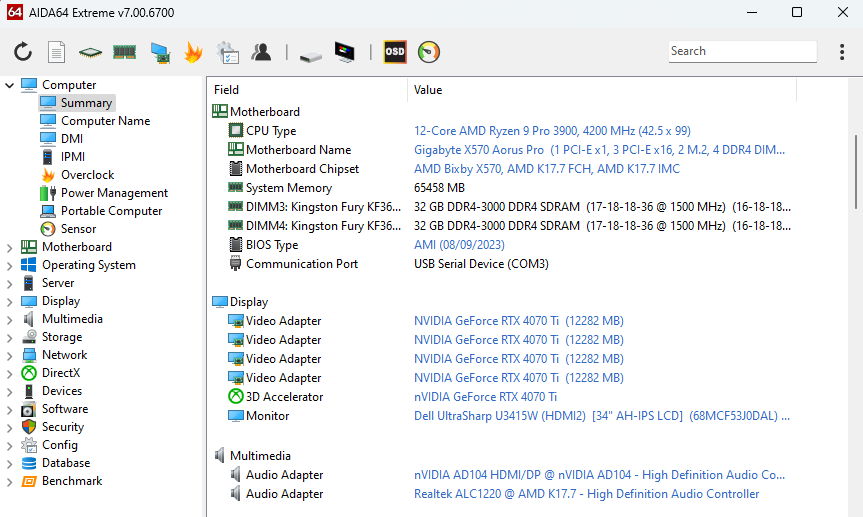
    Revamped user interface with configurable toolbar

    Introducing a redesigned, cleaner, leaner and more efficient main user interface, featuring a brand-new, customizable toolbar and a powerful search functionality at the top of the window. The toolbar offers complete flexibility, allowing users to choose displayed icons, rearrange them effortlessly, and insert separators for a personalized and intuitive navigation experience. The traditional menu bar is a thing of the past, as its elements find a new home in the kebab menu on the right side. Notably, the AIDA64 CPUID, Cache & Memory Benchmark panel, and GPGPU Benchmark panel have undergone a thoughtful redesign.

    New features & improvements

    • Revamped user interface with configurable toolbar
    • AVX-512 accelerated benchmarks for AMD Ryzen Threadripper 7000 Series processors
    • AVX2 optimized benchmarks for Intel Meteor Lake SoC
    • Enhanced support for AMD TR5 socket motherboards
    • Chipset information for AMD TRX50 and WRX90
    • Improved support for Intel Arrow Lake and Lunar Lake SoC
    • Microsoft Windows 11 2023 Update support
    • Preliminary support for Intel Clearwater Forest and Panther Lake CPU
    • ACPI 6.5 support
    • GPU details for AMD Radeon RX 6750 GRE 12GB
    • GPU details for nVIDIA GeForce RTX 4080 Super

    Quelle: Pressemeldung

  • Gefunden im Netz - Inside Drago

    The Need for Middle Class GPUs in the €250 Price Range: Affordable State-of-the-Art Performance

    Introduction:

    In today’s rapidly advancing technological landscape, graphics processing units (GPUs) have become an essential component for various applications, from gaming to professional design work. However, the high cost of top-tier GPUs often puts them out of reach for many consumers. This blog post explores the need for middle-class GPUs in the €250 price range, offering affordable yet state-of-the-art performance. By addressing the demand for affordable GPUs, we can bridge the gap between budget-conscious consumers and the latest advancements in graphics technology.

    The Importance of Price Range:

    The price range of a product plays a crucial role in determining its accessibility to a wider consumer base. While high-end GPUs offer unparalleled performance, their exorbitant prices make them unattainable for the average consumer. On the other hand, entry-level GPUs may be affordable, but they often lack the power and capabilities required for demanding tasks. This is where middle-class GPUs in the €250 price range come into play.

    Affordability for the Masses:

    Affordability is a key factor when it comes to technology adoption. By offering GPUs in the €250 price range, manufacturers can tap into a larger market segment, making high-performance graphics accessible to a wider audience. This affordability empowers budget-conscious consumers, including students, casual gamers, and creative professionals, to experience the benefits of state-of-the-art graphics without breaking the bank.

    State-of-the-Art Performance:

    Middle-class GPUs in the €250 price range can provide a significant boost in performance compared to entry-level options. These GPUs often feature advanced architectures, higher core counts, and increased memory bandwidth, allowing users to enjoy smoother gameplay, faster rendering times, and improved productivity. By striking a balance between price and performance, these GPUs offer a compelling proposition for consumers who demand more than entry-level capabilities but cannot afford top-tier options.

    Closing the Gap:

    The availability of middle-class GPUs in the €250 price range helps bridge the gap between affordability and state-of-the-art performance. It allows consumers to experience the latest advancements in graphics technology without compromising their budget. Moreover, this price range encourages healthy competition among manufacturers, driving innovation and pushing the boundaries of what is possible in the mid-range GPU market.

    Conclusion:

    In summary, there is a strong desire for mid-range GPUs available at an affordable price of around €250. These GPUs offer exceptional performance while remaining budget-friendly, catering to cost-conscious individuals who prioritize high-quality graphics. Moreover, middle-class GPUs expand the market for manufacturers and allow a wider audience to explore the realm of advanced graphics technology. As technology continues to progress, it becomes crucial to make cutting-edge performance readily accessible to everyone, and this precisely highlights the significance of mid-range GPUs priced at €250.

    Written by Simplified AI and me